Support · No longer in production · No longer in production · EOL: TMA-2 Move Wireless & TMA-2 Move XE Wireless
EOL: TMA-2 Move Wireless & TMA-2 Move XE Wireless
Please note that from 2026 S10 Speaker unit is end of life
S10 SPEAKER UNITS - General
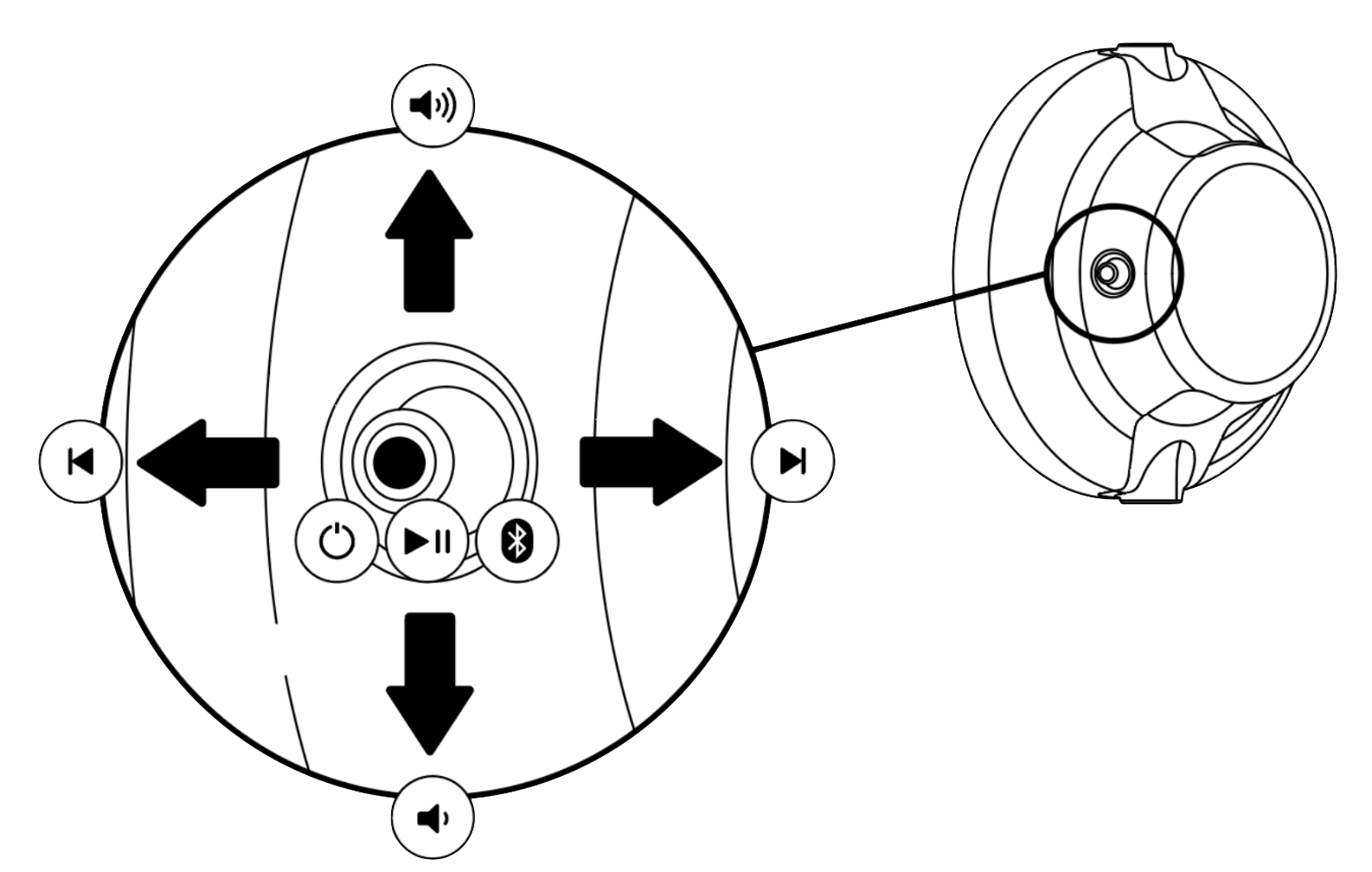
You can connect to the S10's with Bluetooth, or cable.
Joystick Functions
The S10 Speaker Units feature an intuitive joystick control on the the right speaker unit (marked R).
Power S10 on/ off
- Power S10 ON: Press and hold the joystick until LED turns on
- Power S10 OFF: Press and hold the joystick until LED turns off
Enter Pairing mode:
- When S10 is turned off: Press and hold until LED turns on and flashes rapidly.
- When S10 is turned on: Hold the joystick to the right until LED flashes rapidly.
Play/pause: Single press
Volume: Move up or down
Next/previous: Move right or left
Charging
The S10 speaker units is charged through the USB-C socket on the right speaker unit (marked R) with the
provided charging cable or any USB-C cable.
With fast charging on the S10 speaker units, 20 min of charging gives min. 3 hours of playback time,
and 2 hours from 0% to 100%. Charging through a computer takes longer.
S10 LED Feedback
| State | LED Response |
|---|---|
| 0-50% battery while charging | Blinking Red (1 sec on, 1 sec off, loop) |
| 51-99% battery while charging | Blinking green (1 sec on, 1 sec off, loop) |
| 100% charged while charging | Constant Green |
| In Pairing mode, | Blinking Blue (300ms on, 300ms off, loop) |
| Not paired (idle mode) | Blinking Blue (1s off, 1s on, loop) |
| Paired and connected | Constant blue |
| Resetting pairing | Blinking Red (1s on, 1s off, 1s on) |
| Turning off while <10% battery level | Blinking Red (1s on, 1s off, 2 cycles) |
| Turning off while >10% battery level | Blinking White (1s on, 1s off, 2 cycles) |
| Paired and connected <10% battery level | Blinking Red (1s on, 1s off, loop) |
Download the Product Manual below
Follow





Subscribe
© 2026 AIAIAI. All Rights Reserved.